Installation
To install the plugin, press the button below to get taken to Roblox's Creator Store. Press Get Plugin, then Try in Studio. Once Studio opens, go to the Toolbox and press Install. The plugin's tools will be available in the Plugins tab.
Updating the plugin
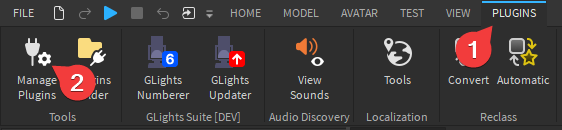
We might release updates to the plugin from time to time. Some parts of the plugin require the most up-to-date version. To update the plugin, go to the Plugins tab, then to Manage Plugins and press Update next to the plugin.