Keybinds
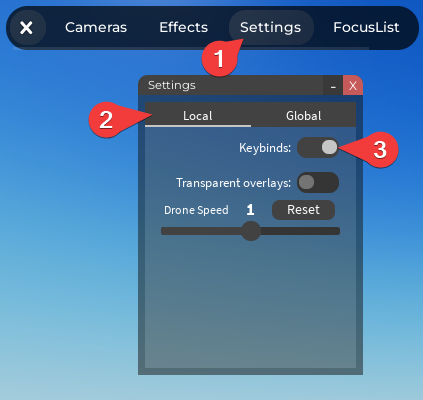
You can control (most of) the camera system with your keyboard using keybinds. Keybinds are added to the Settings script and can be enabled in-game in the Settings > Local window.
Adding keybinds
info
Adding keybinds requires a bit of scripting knowledge
To add keybinds, open the Settings script and scroll down to the Keybinds setting. A template for a keybind is
{ Keys = { KEYS_TO_ACTIVATE }, Action = { ACTION } },
Keys
KEYS_TO_ACTIVATE is a table of keys that need to be pressed down for the keybind to activate, for example:
Keys = { Enum.KeyCode.X }if you want the keybind to activate when X is pressedKeys = { Enum.KeyCode.LeftShift, Enum.KeyCode.One }if you want the keybind to activate when Shift is pressed down and you press 1
You can find a list of all possible keys here
Actions
ACTION is a table that tells the system what should happen when the keys are pressed, here's a full list of actions:
{ "Fov", FOV, TIME }to change the fov, for example{ "Fov", 120, 6 }to change the fov to 120 over 6 seconds{ "Blackout", BOOL? }to toggle the blackout, for example{ "Blackout", true }to enable it and{ "Blackout", false }to disable it. If true or false isn't specified, then the keybind will work as a toggle.{ "Bars", BOOL?" }to toggle the bars. Same as above.{ "Transition", TRANSITION_NAME }to change the transition type, currentlyTRANSITION_NAMEcan only beNone,BlackorWhite. For example{ "Transition", "Black" }to change the transition to black.{ "TransitionSpeed", SPEED" }to change the transition speed,SPEEDis a number that represents the % of the normal speed, so{ "TransitionSpeed", 100 }for normal speed,{ "TransitionSpeed", 50 }for half the speed (50%), etc.{ "Shake, INTENSITY }to change the intensity of the Shake effect, set to 0 to disable. For example{ "Shake", 5 }to set the shaking to intensity 5.{ "Blur", BLUR, TIME }to change the blur. Same as FOV.{ "Saturation", SATURATION, TIME }to change the saturation. Same as FOV. Saturation = -1 means the image will be black and white{ "Tilt", TILT, TIME }to change the tilt. Same as FOV. Tilt = 0 means no tilt.{ "Camera", CAMERA_TYPE, CAMERA_NAME }to change the camera, for example{ "Camera", "Static", "TEST" }will change the camera to a static one namedTEST
Enabling keybinds
To use keybinds, you first need to enable them in-game. To do that, go to the Settings window and Local tab and toggle Keybinds